
Intro #
To look at what runs in a Kubernetes cluster you need a kubeconfig with a credential in it, a way to reach the API server, and kubectl or k9s on the machine you sit at.
For one person and one cluster that is fine. With more people and more clusters it becomes work. Every kubeconfig has to be made, handed over and at some point taken away again. The API server is usually on a private network, so there is a VPN or a bastion in front of it. And somebody who only wants to see why a pod keeps restarting has to install tools first.
For machines, SSH has had an answer to this for a very long time. Everybody has the client and a key, and letting somebody in is one line in a file.
kosh is that for a cluster. It runs inside the cluster and is an SSH server. Whoever connects with a key from its list gets a terminal UI that behaves like k9s. With iroh-ssh instead of ssh, the cluster does not even need an address you can reach.
I did not write it. kosh is LLM generated, the tests and the README included.
What You Get #
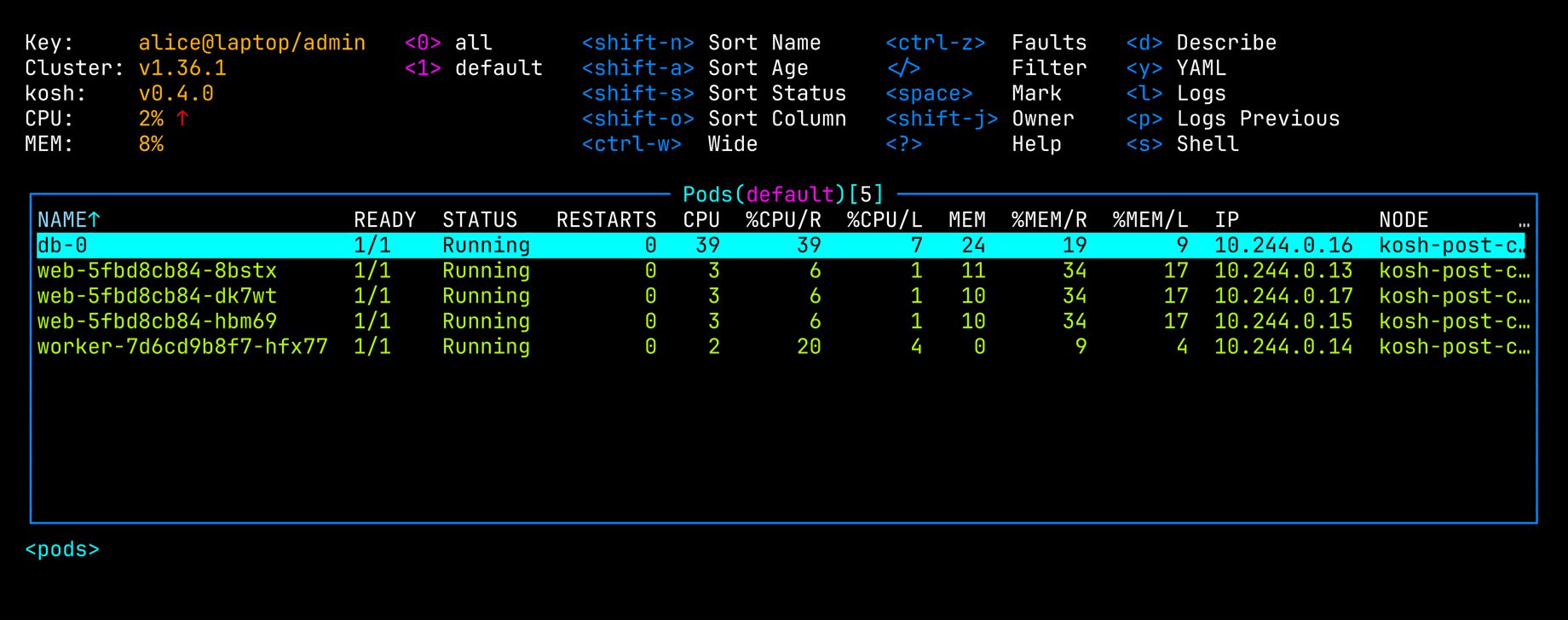
That is a small test cluster, seen through ssh.
The keys are the ones k9s has. : goes to a kind, as in :deploy or :po kube-system. / filters, enter goes into a row, and d, y and l are describe, YAML and logs. 27 kinds have a table of their own, mostly with the columns k9s shows for them. Everything else, custom resources included, is listed the way kubectl get prints it.
CPU and memory are there because this cluster has metrics-server. kosh then shows them in the header and in the tables of pods, containers and nodes.
kosh is one pod with one process in it. It draws the UI for every session itself and talks to the Kubernetes API from the inside, with its own ServiceAccount. So nobody who connects holds a credential for the cluster, and the API server does not have to be reachable from outside.
Installing It #
kosh comes as a Helm chart, and one command installs it:
helm install kosh oci://ghcr.io/fables-for-robots/charts/kosh --version 0.4.0 \
  --namespace kosh --create-namespace \
  --set state.persistence.enabled=true \
  --set-file authorizedKeys=authorized_keys
authorized_keys is the list of who gets in. There is more about it below.
kosh has two keys of its own, an iroh key and an SSH host key. With state.persistence.enabled it makes them at its first start and keeps them on a PersistentVolumeClaim of 16Mi, so both stay the same when the pod is replaced. What you need of them is in its log:
kubectl --namespace kosh logs deploy/kosh | grep 'kosh is serving'
time=2026-10-14T20:58:19.213Z level=INFO msg="kosh is serving" version=v0.4.0 endpoint=2b1bbf83b52a7c94eacb669b777779fe15e70250b637ade3da3b891eaf62c471 ssh=[::]:2222 hostkey=SHA256:YDT0bYYHZ+Df6bYjGzXiBz17Bw+IgmiStGmrluL4Qjg cluster=v1.36.1
endpoint is what iroh-ssh dials. hostkey is the fingerprint of the SSH host key, to compare on the first connect.
The two keys can also be made before the install, with kosh id from the image, and handed to the chart as a Secret with state.existingSecret. Then the endpoint ID is known before anything runs and does not depend on a volume. The README has the commands.
ssh #
A fresh install opens no port to the outside, the Service is a ClusterIP. For a first look a port-forward is enough, although it needs exactly the kubectl this was supposed to save you:
kubectl --namespace kosh port-forward service/kosh 2222:22
ssh -t -p 2222 localhost
For real use, --set service.type=LoadBalancer puts SSH behind a load balancer, and service.loadBalancerSourceRanges says who may reach it.
ssh checks kosh’s host key like any other. On the first connect it shows the key’s fingerprint and asks. The answer can be the hostkey from the log instead of yes, and ssh then goes on only if the two are the same. The user name does not matter, only the key is looked at.
iroh-ssh #
A load balancer is still an address, and somebody has to be allowed to reach it. The second way in does without one.
iroh connects two programs by public key instead of by address. Both sides dial out to a relay, then try to find a direct path to each other through whatever NAT is in between, and stay on the relay if there is none. iroh-ssh is SSH over such a connection.
kosh has an iroh endpoint next to its SSH port, and the endpoint from the log is its public key. That ID is all a user needs:
iroh-ssh kosh@2b1bbf83b52a7c94eacb669b777779fe15e70250b637ade3da3b891eaf62c471
For this kosh needs outgoing traffic and nothing else. No Service has to be exposed and no firewall opened. The cluster in the screenshots is a kind cluster in Docker on my Mac, and nothing of kosh is published to the host. iroh-ssh 0.2.12 on the same Mac found it by the endpoint ID alone. It took between one and seven seconds until the pods table was up.
The SSH host key is still checked, inside the iroh connection. iroh-ssh hands ssh the endpoint ID as the host name, so ssh asks about the key once more, under that name.
iroh is on unless you install with --set iroh.enabled=false, and there is one thing to know about it. To be found, kosh publishes a record under its endpoint ID in public DNS, and the record lists its addresses, private ones included. They are of no use to anybody who cannot reach them, but they are public.
Keys #
The list is the text of an OpenSSH authorized_keys file, and it is the same list for both ways in:
ssh-ed25519 AAAAC3Nza... alice@laptop/admin
ssh-ed25519 AAAAC3Nza... bob@laptop
The comment after a key is its name, and the name says what the key may do. A key whose name ends in /admin is an admin and may do everything kosh does. Every other key is read-only. The name is also what the header shows and what ends up in the log. A line with an option in front of the key, or one that does not parse, gives no access at all.
A read-only key has none of the keys that change anything, and it opens no shell. It also does not get to see what is in a Secret:
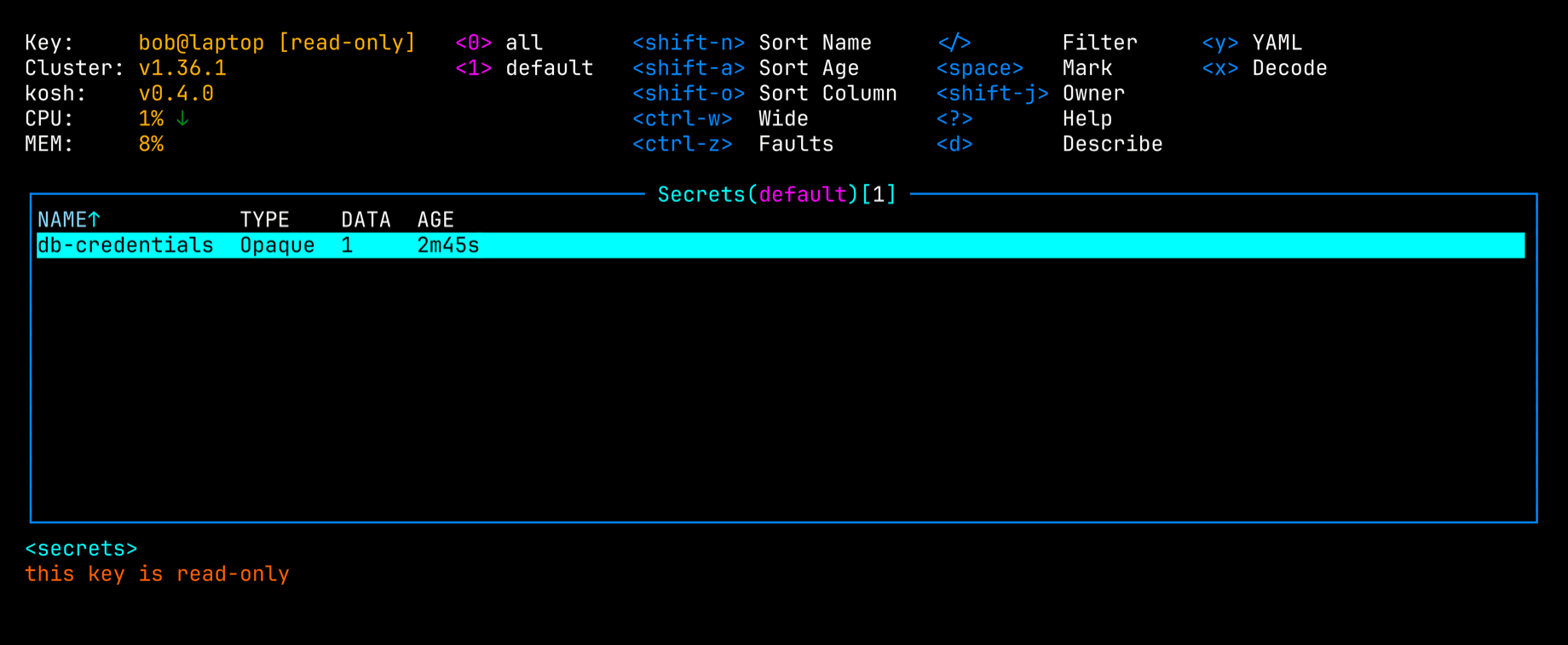
The table of secrets is there, but YAML, describe and decode are refused. A Secret often holds a credential that can write, and a read-only key that could read it would be read-only in name. Everything else the ServiceAccount may read is visible, ConfigMaps and the environment of pods included.
kosh follows the list without a restart. I took bob’s line out with a helm upgrade three times. His open session ended with kosh: this key is no longer accepted after 59, 25 and 64 seconds. The wait is the kubelet updating the mounted file, kosh itself looks at it every two seconds.
What a Key Can Do #
Every session talks to Kubernetes as kosh’s ServiceAccount, and unless you say otherwise the chart binds that to cluster-admin. An admin of kosh is a cluster administrator. --set rbac.clusterRole=view, or any other ClusterRole, makes it less, and kosh then shows the API’s refusal wherever it lacks a right.
The actions are k9s’s: delete, kill, edit, scale, restart, set image, roll back, trigger and suspend a CronJob, cordon, uncordon and drain. Each of them asks first:
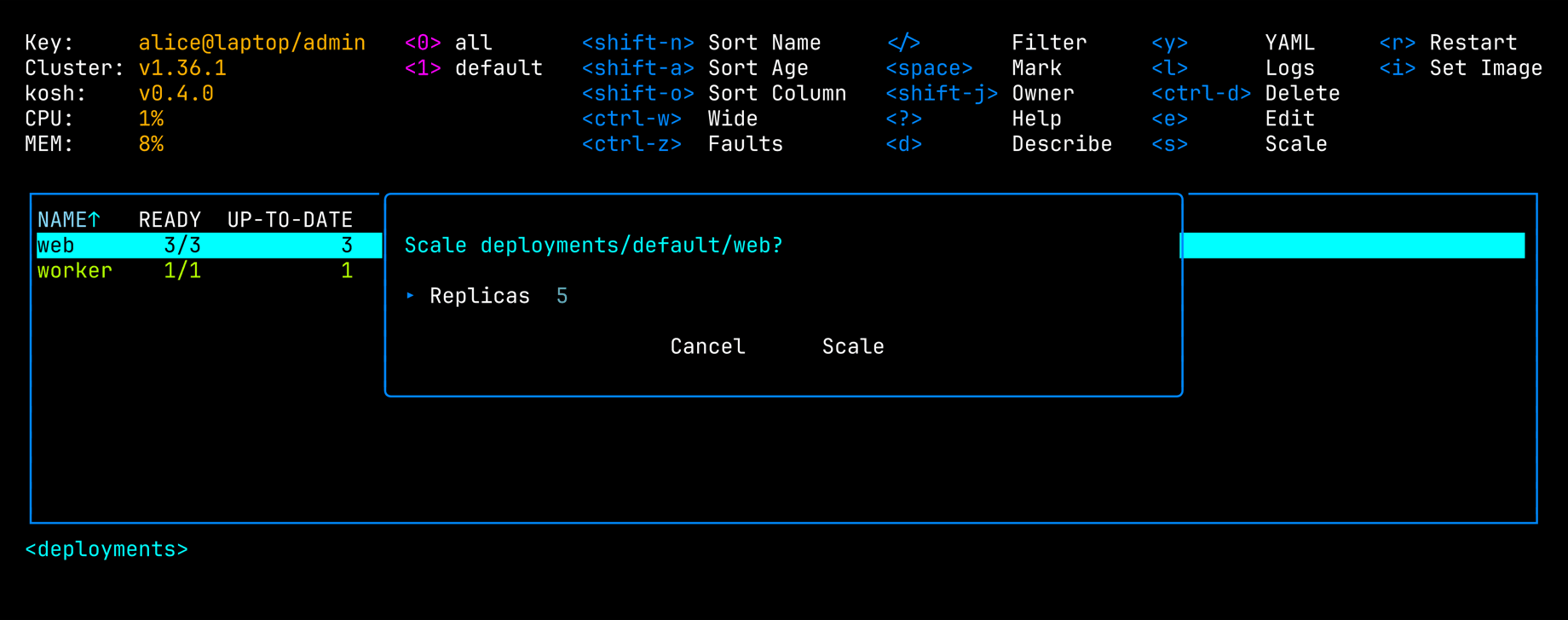
Because everybody is the same ServiceAccount, the audit log of Kubernetes only ever names kosh. Who it was is in kosh’s own log, one line per action:
time=2026-10-14T21:00:13.806Z level=INFO msg=action key=alice@laptop/admin fingerprint=SHA256:VqW7oSSL+5FumX5fSmxryd0JpTYEDsSbN0oYrb3NY1k action=scale object=deployments/default/web replicas=5
A Shell in a Pod #
s on a pod asks for the container and the command, and then hands your terminal to a shell in that container, the way kubectl exec -it would:
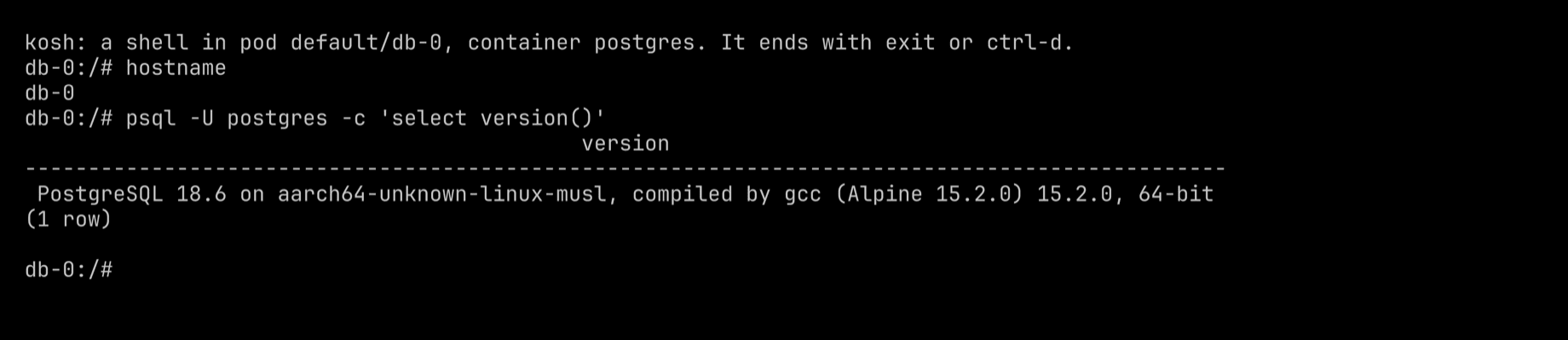
The command is bash where the image has it and sh otherwise, and it can be changed before the shell starts. exit or ctrl-d brings the table back. kosh logs who opened a shell in which container, with which command and for how long. What is typed in it is not logged.
Security #
kosh is a single Go binary, linked statically. The image holds that binary, the CA certificates it needs to reach the iroh relays, a passwd and a group file for the user it runs as, and the licence texts. There is no shell in the image and no other program, not even a libc.
So kosh does not call kubectl. It talks to the Kubernetes API directly, with client-go, the library kubectl itself is built on. A shell in a pod is a call to that API too, and the process it starts runs in the other pod.
The chart runs the pod as user 65532 with the runtime’s default seccomp profile, and gives the container this:
securityContext:
  allowPrivilegeEscalation: false
  readOnlyRootFilesystem: true
  capabilities:
    drop:
      - ALL
None of it is a value of the chart, so no --set turns it off.
There are no other moving parts. The chart installs a Deployment with one pod, a Service, a ConfigMap with the key list, the volume claim for the two keys and a ServiceAccount with its binding. That is all of kosh. It needs no database and no CRD, and it puts nothing on the nodes.
All of this is about what somebody could do from inside kosh’s container. What the ServiceAccount may do in the cluster is the ClusterRole from above, and no securityContext changes that.
LLM Generated #
kosh was written by Claude.
Limitations #
Attach, port-forward and copying files are missing. kosh shows the one cluster it runs in. Everybody acts as the same ServiceAccount, so a person is either an admin or read-only and there is nothing in between.
It runs as exactly one replica, because two endpoints with the same iroh key throw each other off the relay. In the first minute after it starts, iroh-ssh can fail with Discovery produced no results, and a DNS resolver that has cached the missing record keeps failing for a few minutes more. What was started in a shell can go on running in the container after the session is gone, as with kubectl exec.
kosh keeps every object of a kind that somebody is looking at in memory. The design expects that to be fine for some thousands of pods and not for much more. Its end-to-end tests run in a kind cluster on Linux, and a kind cluster is what the screenshots are from.
Alternatives #
If everybody who needs the cluster has a kubeconfig and a way to the API server anyway, use k9s. kosh mimics a subset of it.
The old way to get a cluster over plain SSH is a bastion with kubectl and k9s on it. It works, but it is a machine to look after, with a kubeconfig on it that everybody who logs in shares.
If every person has to be themselves towards Kubernetes, with their own RBAC and their own name in the audit log, kosh cannot do that. Teleport can, and so can the API server proxy of the Tailscale operator. Both come with a client to install and a service to run or to subscribe to.
The code is at github.com/fables-for-robots/kosh. If you try it, I would like to hear how it went.